Usage
To use labzen in a project:
from labzen import labzen as lz
We have provided two dummy lab files, one Rmarkdown lab and one Jupyter notebook, to show the functionality of the labzen package.
To access the dummy lab files, you can either clone the repository using the following command:
git clone https://github.com/UBC-MDS/labzen.git
Or, you can download them in your working directory using the following python code:
# Download the demo files into the working directory
import urllib.request
baseurl = "https://raw.githubusercontent.com/UBC-MDS/labzen/main/data-raw"
labs = {
    "dummylab.Rmd": f"{baseurl}/dummylab.Rmd",
    "dummylab.ipynb": f"{baseurl}/dummylab.ipynb",
}
for name, url in labs.items():
    urllib.request.urlretrieve(url, name)
Counting Points
To show the functionality of count_points, we are using a Jupyter notebook dummy lab.
From the root of the repository/ working directory run the following python code:
# dummylab.ipynb is located inside the data-raw folder.
df, tab = lz.count_points("data-raw/dummylab.ipynb")
print(df)
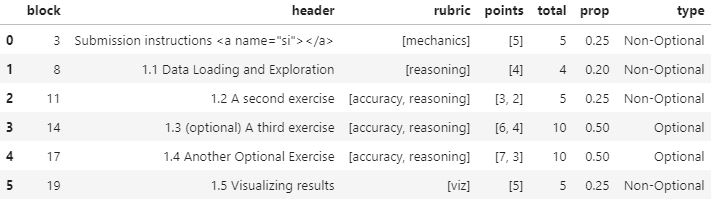
The table above shows that there are 6 sections in this lab, and whether these points are optional or not. The total number of points is shown in the total column. Since requires quesitons only are meant to get you to a 95% grade, the optionals may imply a total percentage that is less than (or more) than 100% in the prop column. For convenience, the total marks can also be viewed via:
print(tab)
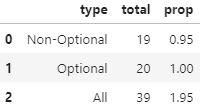
In this dummy example, we can see that the optional questions are worth a lot of marks– more than enough to get to 100% if completed. It is always good to have optional questions!
Checking Mechanics
Have you ever forgotten to include a Github link, to push your main branch to Github Enterprise, or to commit at least three times?
check_mechanics() is your friend. Let it perform these checks so that you never lose mechanics marks again!
In order to use check_mechanics, you need to provide the following arguments to the function:
A local path to a Github directory of your MDS lab or an MDS lab file (.ipynb or .Rmd) within such a directory.
A personal access token for https://github.ubc.ca. See Github Tokens for a guidline on how to generate your personal token from Github Enterprise.
Then, you can run check_mechanics() as follows:
file = "~/MDS/Block5/lab1/DSCI_599_lab1_jene3456"
#for windows you may have to use the following path format
#  C:\\Users\\jene\\MDS\\Block5\\lab\\DSCI_599_lab1_jene3456
token = "544c96ce0d3dc9b66ac8d70b32c07bd0c46129db"
lz.check_mechanics(file, token)
Check 1: Repository has at least 3 commits with the student
username JENE SMITH
Check 1: True
Check 2: Remote has the latest version of the repository
Check 2: True
Check 3: Repository link is included in the file
Check 3: True